
Smart Vent sizing
How to measure your vents.
Vents come in many sizes and can vary from room to room. Measure each supply vent before you order, so every Smart Vent fits. All you need is a tape measure or your phone, and it only takes a few minutes.
Smart Vents replace floor, wall and ceiling vents.
Three ways to measure
Pick the method that works for you.
Use any of these methods for each supply vent. In Canada, only the duct opening method works.
-
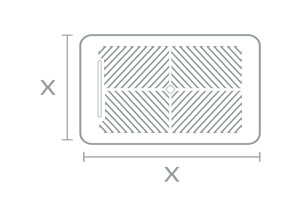
1Fastest
Outside dimensions
Measure the outside of the vent cover and round down to the nearest even inch.
-
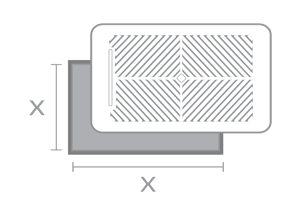
2Most accurate
Duct opening
Remove the vent cover and measure the duct opening directly.
-

3Use a measuring app
Out of reach?
Use your phone's AR measuring app: Apple Measure (iOS) or AR Ruler (Android). Aim at the vent and read the dimensions on screen.
Measuring the duct opening.
- Remove your vent cover. Lift floor vents straight out. Wall and ceiling vents are held in with screws.
- Measure the width and height of the duct opening. Measure the inside of the opening, not the cover.
- Write down the size for each room. Then repeat for every supply vent you want to replace.
Keeping track of a lot of rooms? The Zoning worksheet has space for each room's vent sizes, one page per floor.
Download the worksheet (PDF) ›

Smart Vent sizes
Match your vents to a Smart Vent size.
Smart Vents come in these sizes, in inches.
- 4 by 10 inches
- 4 by 12 inches
- 4 by 14 inches
- 6 by 10 inches
- 6 by 12 inches
- 6 by 14 inches
- 8 by 8 inches
- 8 by 10 inches
- 10 by 10 inches
- 12 by 12 inches
Start your plan now and measure later.
In the System Builder, pick Measure later for any vent. The builder saves your plan, so you can come back and add sizes when you're ready. You'll need a size for every vent before you order.
FAQ
Questions about measuring your vents.
How do I measure my vents for Flair Smart Vents?
What sizes do Flair Smart Vents come in?
Do Smart Vents work in floor, wall and ceiling vents?
How do I measure a vent I can't reach?
Can I order Smart Vents before I measure?
What if my vent doesn't match a Smart Vent size?
How do I install Smart Vents once I've measured?
Next step
Got your sizes? Build your system.
Answer a few questions about your home, and you'll see what to buy and why.